Common behavior (All gateways)
All Kerlink iSeries gateways have, at least, 2 main LEDs:
- a green LED called Power Led
- a red LED called Status Led
On indoor gateways (iFemtocell, iZeptocell), these leds are mixed into one bi-color LED.
Here is the status of these leds during various states:
| Gateway state | Power Led | Status Led | Note |
|---|---|---|---|
| Runtime | 🟢 | ⚪ | Gateway is operational |
| (re)Booting | ⚪ | 🔴⚪ (Blinking) |
DO NOT UNPOWER |
| Upgrade | |||
| Restore |
Additional Leds (Indoor gateways)
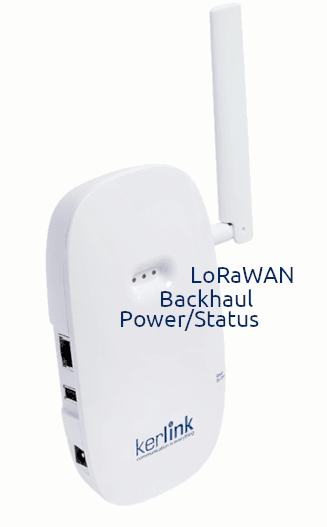
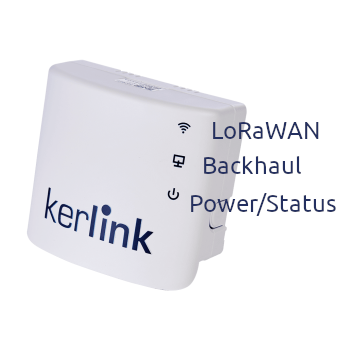
On indoor gateways, 3 bi-leds are available.
They are called:
- LED1: Power/Status Led - See "Common Behavior" above.
- LED2: Backhaul Led - Aims to reflect the data connection state.
- LED3: Lorawan Led - Aims to reflect the LoRaWAN™ service state.
iFemtoCell, iFemtoCell-evolution
iZeptos
Backhaul Led
| Gateway state | Backhaul Led | Note |
|---|---|---|
| System (re)Booting | ⚪ | DO NOT UNPOWER |
| Unable to connect to Kerlink maintenance services |
🔴 | Check your backhaul configuration |
| Connection in progress | 🔴⚪ (blinking) |
|
| Connected to Kerlink maintenance services |
🟢 | Gateway is operational (for cellular connection, see below) |
When using cellular connection, the connected state is extended to reflect the signal quality:
| Signal quality | Backhaul Led | Strength |
|---|---|---|
| Good | 🟢 | >= 60 |
| Medium | 🟢⚪ (blinking) |
30 - 60 |
| Poor | 🟢🔴 (blinking) |
< 30 |
The strength value is given by the modem and is evolving depending on the received signal, so is the Backhaul LED.
LoRaWan Led
| Gateway state | Lorawan Led | Note |
|---|---|---|
| System (re)Booting | ⚪ | DO NOT UNPOWER |
| Unable to connect LNS | 🔴 | Check your LNS configuration |
| Connected to a LNS | 🟢 | Gateway is operational |
| - Uplink packet received | 🟢⚪ (one blink) |
|
| - Downlink packet sent | 🟢🔴 (one blink) |